Tuesday, 29 August 2017

Apple has some bad news for iPhone 8 fans

Apple is all set to launch the next generation iPhone in next month and the device is expected to feature many revolutionary changes which were missing from the Apple smartphone compared to the Android competitors.


One of the biggest features that are expected to come in iPhone 8 is much awaited wireless charging. News about the feature has excited me as well, but there’s a chance that it would be slow compared to the existing standards.
Japanese site Macotakara claims the iPhone 8 will use inductive charging at 7.5W, which is half the speed of the latest Qi 1.2 standards. While wireless charging is coming to the iPhone 8, it is likely to be slower than the charging setup used by several Android smartphones. Nevertheless, it will be still faster than the existing 5W charger.


It’s also being reported that the iPhone 8 will use Qi wireless charging standard, the device won’t work with third-party chargers. This is primarily because Apple has its MFi (Made for iPhone) certification program in place. In other words, users will have no option but to either get genuine Apple or certified chargers.


This also means that the iPhone 8 wireless charging will be considerably slower, and is likely to take much longer to reach full charge. If true, it might be wise and faster to just stick to the standard charger for a speedy charge. It is currently unknown if Apple has tied up with third-party accessory manufacturers for other variants of their chargers. If the iPhone is charged using any other charger, the device will simply not accept the charge as it will most likely come inbuilt with a Mfi license detector.

Must Read: iPhone 8 concept design which will blow your mind
Tipster Vengya Gaskin has also shared an image of the iPhone 8 PCB which is ‘L’ shaped via Twitter. It is unknown if the smaller iPhone 7s and iPhone 7s Plus will also sport the same ‘L’ shaped PCB. The smaller PCB also comes with a support for larger battery something that has been a constant demand from iPhone users. iMyFone D-Back iPhone Data Recovery Get Back Lost Files on iPhone.
If you lost data after you updated to a new iPhone, you can always use Gihosoft iPhone Data Recovery to get the data back from the old iPhone or backup.You may also like: iphonerecovery.com

Must Read: Two great new feature of iPhone 8 is discovered in new iOS 11 beta

The premium version of the iPhone, which will likely to be unveiled on September 12, may cost upwards of $1000 (or approx Rs 65,000). Also known as the tenth anniversary iPhone, the said smartphone will be dramatically redesigned. Apple may also increase the size of the display by reducing the bezels, similar to the Samsung Galaxy S8. Apple iPhone 8 will reportedly be offered in different storage capacities of 64GB, 256GB, and 512GB.


Other than this iPhone 8 is expected to feature bezel-less AMOLED display and Face Recognition system. Many reports in past suggested the iPhone 8 will not feature the fingerprint sensor and this system will be replaced by Face Recognition system on the device.
iPhone 8 will feature dual camera and device will miss the headphone jack just like iPhone 7 and iPhone 7 Plus. So, what you people think? Slow wireless charging is enough for the iPhone users or it is like giving a lollipop to crying baby. So share your views in the comment section below.

YouTube’s New Look & Design with Updated Logo [Video]

YouTube now come up with new design and look for mobile and desktop experience with some modification logo in it. It’s a simple change in logo, play icon is left to the title and no red in tube section of logo. Besides that, YouTube has updated with so many new features and changes.
 When YouTube launched 12 years ago, it was a single website that supported one video format, 320x240 at 4:3 aspect ratio. Fast forward to today, and YouTube lets you watch any combination of SD, HD, 4K, 360, 3-D, and live video on nearly every device with an internet connection – from desktops to phones, tablets to TVs, game consoles, and even VR headsets.
YouTube now come up with new design and look for mobile and desktop experience with some modification logo in it 
What’s new in YouTube?

YouTube Mobile
  • Clean new design: We’ve made the header white to let content take the lead and moved the navigation tabs to the bottom of the app so they’re closer to your thumbs. We also added new Library and Account tabs that give you easy access to what you’re looking for.
  • Videos that move with you: One of the things we’re working on is bringing gestures to YouTube. Earlier this year, we introduced a gesture that allows you to double tap on the left or right side of a video to fast forward or rewind 10 seconds. Give it a try! We already see billions of double taps per day. And I wanted to give you a sneak peek at another gesture I am really excited about. In the coming months, we'll experiment with a feature that lets you jump between videos with a simple swipe of your hand: just swipe left to watch a previous video or swipe right to watch the next one.
  • Watch at your own pace: Users love that they are able to speed up and slow down the playback of a video on desktop, and we're excited to bring this feature to the mobile app today, so you can enjoy videos at whatever speed you prefer.
  • Adapt to any video, beautifully: We've also been experimenting with new ways to display all videos in the best possible way. Soon, the YouTube player will seamlessly change shape to match the video format you’re watching, such as vertical, square or horizontal. That means you’ll always get the best viewing experience automatically – including vertical videos with no black bars on the sides!
  • Browse and discover while you watch: We recently added a feature that lets you view a row of suggested videos while you’re watching in full screen. We're also working on transforming the area below the player so you can browse videos in totally new ways.

YouTube Desktop
  • Material Design: Delivers a fresh, simple and intuitive user experience that lets content shine
  • Dark Theme: Turns the background dark while you watch for a more cinematic look.
Take a look at the video;


How to be an ace with files on iOS 11 ?

How to be an ace with files on iOS 11 ?


With iOS 11, we can leave behind several of the shortcomings that the operating system has dragged through all these years. From the lack of gestures like drag and drop, to a completely necessary enhancement in the multi-tasking of the iPad. But if there is something that has improved especially, is managing the files with the new version. And is that, from the moment the new update is released, users will be able to manage their content in a completely different way .
This is due to the arrival of the new Files app, which lands on iOS 11 to bring order to our storage space. With this new application, we will not only be able to consult the files we have in the memory of our iPad or iPhone, we will also have the option to connect to a multitude of services in the cloud , such as Box. This way, we will have all our files in one place. Sponsor ads:
Gihosoft iPhone Data Recovery Free

Files, one of the main new features of iOS 11

The interesting thing about this new app, which you can know more in depth in the video you can find in this article, is that it is fully compatible with all the new features of iOS 11. This will allow us to ignore other solutions provided by third parties, which Were limited by the limits that Apple imposes when accessing the files stored in the internal memory of the device.
As we have commented, this novelty will arrive with iOS 11 in the coming months. But if you want to participate in its development, and contribute your bit with your comments, you can download the public beta from the program of betas Apple . That way you can know the new functions before anyone else, something that you sure like many of you.
And you, how did you manage your files so far?

5 useful gadgets to get the most out of your iPhone and iPad

5 useful gadgets to get the most out of your iPhone and iPad


The Apple iPhone is a wonderful tool that facilitates all the daily tasks of our day to day.But thanks to some accessories and gadgets it is possible to take more advantage of all its functions.
In this article we will present a series of accessories that will offer you the possibility to get the most out of the iPhone and iPad .
Discover the best gadgets for your Apple device, from load docks to HomeKit accessoriesto control them from your iPhone. Shall we begin?

Load Dock

This fantastic Apple official dock will allow you to use your iPhone (upright) anywhere on the surface: in the kitchen, on the bedside table, in the bathroom ... Compatible with all iPhone models.
Price: € 44.99 | $ 54.07
Contact Us | Amazon

Wireless charging Qi

This small gadget will allow you to charge your iPhone wirelessly. If you do not want to buy the iPhone 7s, iPhone 7s Plus or iPhone 8 that will incorporate this technology, this accessory will come to you from pearls.
Price: € 12.99 | $ 15.61
Contact Us | Amazon

Ultra thin case

This very thin Vooway case is available in 6 different colors (blue, black, silver, pink, gold and red) and is very affordable. With it, you can take your iPhone with you anywhere without fear of damage.
Price: € 7.99 | $ 9.60
Contact Us | Amazon

Smart plug

Thanks to this plug you can connect any device or device (lamps, stoves, fans, chargers, etc) to the electric current and control their power on and / or off from the comfort of your iPhone with HomeKit. Magic!
Price: € 45.99 | $ 55.28 Must Read:iMyFone D-Back iPhone Data Recovery–Recover Deleted Data from Your iPhone/iTunes/iCloud Easily! If you lost data after you updated to a new iPhone, you can always use Gihosoft iPhone Data Recovery to get the data back from the old iPhone or backup.You may also like: iphonerecovery.com
Contact Us | Amazon

WiFi HD Security Camera

This security camera has live video streaming, motion detection, incoming and outgoing audio, LEDs for night vision and a 270 degree viewing angle. Especially useful for looking after your pets and your babies.
Price: € 42.69 | $ 51.31

Tuesday, 8 August 2017

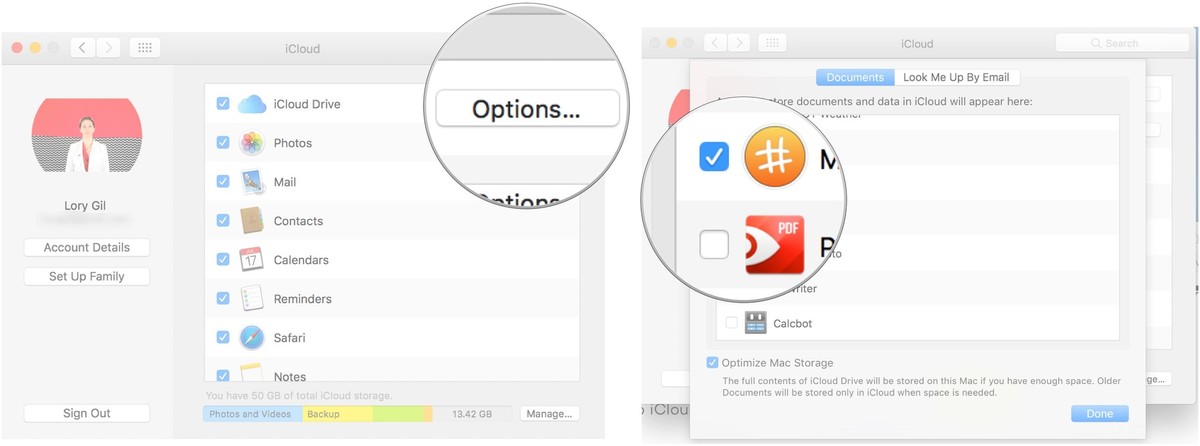
How to revoke iCloud access from third-party apps on Mac 2019


How to revoke iCloud access from third-party apps on Mac


Click on the Apple menu icon in the upper left corner of your Mac's screen.


Click on System Preferences. Must Read:If you lost data after you updated to a new iPhone, you can always use Gihosoft iPhone Data Recovery to get the data back from the old iPhone or backup.


Gihosoft Free iPhone Data Recovery:iphonerecovery.com


Click on iCloud.


Click on Options next to iCloud Drive.


Untick the box for any app you want to revoke access to iCloud Drive.


Click Done to close the window.


Those apps will no longer have access to iCloud Drive and won't sync across your devices, but you'll have a few more megabytes of data in your iCloud storage.


    How to revoke iCloud access from third-party apps ?

    How to revoke iCloud access from third-party apps
    Just as awesome as it is to be able to sync your data across devices, there are some apps that just don't need to do that. For me, that's calculator apps. Storing data you won't ever need to have saved or synced on other devices just eats into your iCloud data, which might be limited, depending on your plan.
    If you lost data after you updated to a new iPhone, you can always use Gihosoft iPhone Data Recovery to get the data back from the old iPhone or backup.You may also like: iphonerecovery.com

    How to revoke iCloud access from third-party apps on iPhone and iPad

    1. Launch the Settings app on your iPhone or iPad.
    2. Tap your iCloud Banner.
      Open Settings, then tap your iCloud banner
    3. Tap iCloud.
    4. Scroll down the list and toggle the switch off for any app you want to revoke access to iCloud Drive. It's white when it's off.
      Tap iCloud, then toggle the switch

    Wednesday, 2 August 2017

    How Blue Whale Challenge Dare Game works ?

    How Blue Whale Challenge Dare Game works

    Blue Whale Challenge is not an app you can download or a game that you can install on your computer. It is a social media phenomenon that has taken root.
    The game derives its name from one of the first disturbing challenges of the game, where players are asked to draw a blue whale on a piece of paper, and then carve the same onto their body. Other tasks include watching horror moviesalone or harming oneself.
    The main target audience is impressionable teenagers contacted online through ‘The Blue Whale Challenge’ game. Once participated, the creators of the group do not allow participants to leave.
    The second step involves introducing oneself to the community and performing game related tasks like watching gory and depressing content online, before starting the game.
    All players are given the deadline of 50 days to complete the 50 tasks. The game begins with fairly simple tasks like getting up early in the morning at 4:20, drawing a whale on paper, as mentioned earlier to the most horrific ones (suicide). It also marks the end of all 50 dares.If you lost data after you updated to a new iPhone, you can always use Gihosoft iPhone Data Recovery to get the data back from the old iPhone or backup.You may also like: iphonerecovery.com
    If you use android phones, please choose Gihosoft Android Data Recovery.
    The 50 days rules appear something like this:
    • Never share anything about this game with anyone
    • Wake up at 4:20 AM every day
    • Listen to the recommended songs and horror movies, every day.
    • Cut yourself. (Different day, different cuts)
    The game requires photographing or video graph every task, so as to furnish the proof of completion and authenticity. There are thousands of posts relating to the sick trend on Instagram. Rumors about Blue Whale Challenge Dare Game prevalence existed for quite some time, but it’s only now that the menace has witnessed an upward trend and has been escalated by manifolds.
    Several have died or killed themselves playing this game. The Indian youths were the latest targets of this deadly game. A class 9 student living in the Mumbai suburb recently committed suicide. The boy had allegedly discussed the game with his friends, who weren’t initially concerned about the game until he talked about suicide. He even expressed his desire of not coming to school anymore. The 14-year-old before committing suicide informed his friend, saying-
    I am going to the building to jump.
    Moments later he jumped off the fifth floor of a building. Investigating are underway to ascertain the link between the death and the game.
    From the above, it’s starkly clear that Blue Whale is not a game but a killing mission, abetting people to commit a crime by taking one’s own life voluntarily and intentionally. As such, it warrants immediate action to stop the spread of such a “game”.
    People, living in rural areas are somewhat immune to this attack as they have a lifestyle quite different from the urban regions. In urban areas parents seem to have less control over their children.

    Restore iPhone to Factory Settings from Computer 2019

    Restore iPhone to Factory Settings from Computer Here is how you can use your iTunes on your computer to restore your iPhone to factory sett...